Configuring security aspects
Starting with Keyrock
Keyrock is a Generic Enabler integrated in the Tour Guide Application, aware of the user profile management, authorization and authentication among others.
For testing purposes, we have generated a set of users, organizations, apps, roles and permissions to be loaded automatically in Keyrock. To load them, we just need to run the following:
$ ./tour-guide configure keyrock
This will load all the information in Keyrock, and automatically sync with Authzforce, the Generic Enabler aware of storing the XACML policies.
Once the information is loaded, we will need to get the Oauth credentials from Keyrock and add them to the Tour Guide Application configuration by doing:
$ ./tour-guide configure oauth
This step can be done also manually. You can go to the Keyrock interface:
http://keyrock:8000
And authenticate with a user with the application provider role (in this application example, the user pepproxy@test.com listed below). There, select the application TourGuide already registered, and you will find there the Oauth credentials (client ID and client SECRET).
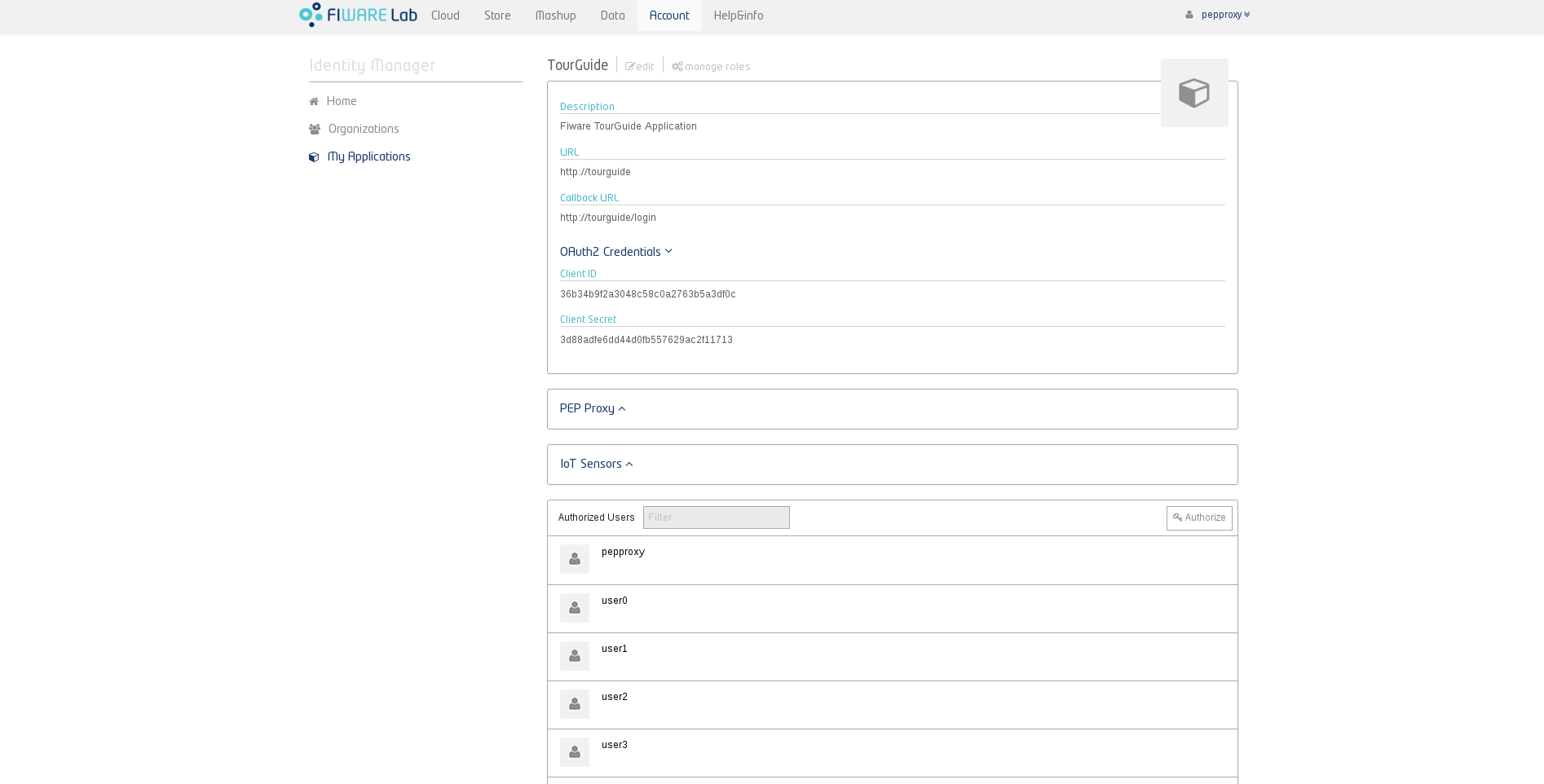
Once you get them, you will need to modify the config.js file inside the tourguide container.
Probably the easiest way is accessing the container:
docker exec -it tourguide /bin/bash
And there, modify the parameters config.clientId and config.clientSecret:
vi tutorials.TourGuide-App/server/config.js
Finally, still inside the container, we should reload apache:
service apache2 reload
IdM Users, Organizations, Apps, Roles and Permissions
The file with all the information related to the set of users, organizations, apps, roles and permissions is available here.
Note: the following provision is intended just for testing purposes. Check the full Keyrock API description here.
Users
The default set of users provided is described below.
| Role | Username | Password |
|---|---|---|
| Admin | idm | idm |
| Provider | pepproxy@test.com | test |
| Owner | user0@test.com | test |
| Owner | user1@test.com | test |
| Owner | user2@test.com | test |
| Owner | user3@test.com | test |
| Owner | user4@test.com | test |
| Owner | user5@test.com | test |
| Owner | user6@test.com | test |
| Owner | user7@test.com | test |
| Owner | user8@test.com | test |
| Owner | user9@test.com | test |
Once generated, you can retrieve the whole list by using Keyrock SCIM 2.0 REST API:
curl -X GET -H "Content-Type: application/json" -H "X-auth-token: ADMIN" "http://keyrock:5000/v3/OS-SCIM/v2/Users/"
And you will see an output like:
{
  "totalResults": 13,
  "Resources": [
    {
      "userName": "idm",
      "urn:scim:schemas:extension:keystone:2.0": {
        "domain_id": "default"
      },
      "active": true,
      "id": "idm_user"
    },
    {
      "userName": "user0@test.com",
      "urn:scim:schemas:extension:keystone:2.0": {
        "domain_id": "default"
      },
      "active": true,
      "id": "user0"
    },
    {
      "userName": "user1@test.com",
      "urn:scim:schemas:extension:keystone:2.0": {
        "domain_id": "default"
      },
      "active": true,
      "id": "user1"
    },
    {
      "userName": "user2@test.com",
      "urn:scim:schemas:extension:keystone:2.0": {
        "domain_id": "default"
      },
      "active": true,
      "id": "user2"
    }

...

  ],
  "schemas": [
    "urn:scim:schemas:core:2.0",
    "urn:scim:schemas:extension:keystone:2.0"
  ]
}
Or generate users yourself, as explained here.
Organizations (or projects if using the Identity API)
Besides the Organizations that Keyrock automatically creates, we’ve provided four Organizations as Franchises.
| Organization name | Description | Users |
|---|---|---|
| Franchise1 | Franchise1 | user0@test.com (owner) |
| Franchise2 | Franchise2 | user0@test.com (owner) |
| Franchise3 | Franchise3 | user0@test.com (owner) |
| Franchise4 | Franchise4 | user0@test.com (owner) |
You can list all of the organizations using:
curl -X GET -H "Content-Type: application/json" -H "X-auth-token: ADMIN" "http://keyrock:5000/v3/OS-SCIM/v2/Organizations/"
This will display the organizations generated:
{
  "totalResults": 27,
  "Resources": [

…

    {
      "active": true,
      "urn:scim:schemas:extension:keystone:2.0": {
        "domain_id": "default"
      },
      "description": "Test Franchise1",
      "name": "Franchise1",
      "id": "f3aa9a45d1174b32a178dd281e801fd8"
    },

    ...

    {
      "active": true,
      "urn:scim:schemas:extension:keystone:2.0": {
        "domain_id": "default"
      },
      "description": "Test Franchise4",
      "name": "Franchise4",
      "id": "06a127d2a7534500bb5fb17b5d54d308"
    }
  ],
  "schemas": [
    "urn:scim:schemas:core:2.0",
    "urn:scim:schemas:extension:keystone:2.0"
  ]
}
Find here how to generate organizations.
Apps
We’ve registered a Consumer (or App) in Keyrock.
| Application name | Description | URL | Redirect URI |
|---|---|---|---|
| FIWARE TourGuide | Fiware TourGuide Test Application | http://tourguide | http://tourguide/login |
You can list them all by running:
curl -X GET -H "Content-Type: application/json" -H "X-auth-token: ADMIN" "http://keyrock:5000/v3/OS-OAUTH2/consumers/"
And the output:
{
  "links": {
    "self": "http://keyrock:5000/v3/OS-OAUTH2/consumers",
    "previous": null,
    "next": null
  },
  "consumers": [
    {
      "scopes": [],
      "redirect_uris": [],
      "description": "Application that acts as the IdM itself. To see the administration section of the web portal grant provider to a user in this application.",
      "links": {
        "self": "http://keyrock:5000/v3/OS-OAUTH2/consumers/idm_admin_app"
      },
      "extra": {
        "is_default": true
      },
      "is_default": true,
      "client_type": "confidential",
      "response_type": "code",
      "grant_type": "authorization_code",
      "id": "idm_admin_app",
      "name": "idm_admin_app"
    },
    {
      "scopes": [
        "all_info"
      ],
      "pep_proxy_name": "pep_proxy_7479c6d8886a4b1db211bd76fda1c1f6",
      "redirect_uris": [
        "http://tourguide/login"
      ],
      "name": "TourGuide",
      "img": "/static/dashboard/img/logos/small/app.png",
      "extra": {
        "url": "http://tourguide",
        "pep_proxy_name": "pep_proxy_7479c6d8886a4b1db211bd76fda1c1f6",
        "iot_sensors": [],
        "ac_domain": "zgUcVoWDEea5lAJCrBEABw",
        "img": "/static/dashboard/img/logos/small/app.png"
      },
      "url": "http://tourguide",
      "ac_domain": "zgUcVoWDEea5lAJCrBEABw",
      "links": {
        "self": "http://keyrock:5000/v3/OS-OAUTH2/consumers/36b34b9f2a3048c58c0a2763b5a3df0c"
      },
      "iot_sensors": [],
      "response_type": "code",
      "client_type": "confidential",
      "grant_type": "authorization_code",
      "id": "36b34b9f2a3048c58c0a2763b5a3df0c",
      "description": "Fiware TourGuide Application"
    }
  ]
}
Or generate your own as explained here
Roles
The following list shows the roles generated:
| Role name | Granted to user |
|---|---|
| Provider | pepproxy@test.com |
| End user | All |
| Franchise Manager | user0@test.com (Franchise1) |
| Franchise Manager | user1@test.com (Franchise2) |
| Franchise Manager | user2@test.com (Franchise3) |
| Franchise Manager | user3@test.com (Franchise4) |
| Global Manager | user0@test.com |
You can retrieve them by executing the following query:
curl -X GET -H "Content-Type: application/json" -H "X-auth-token: ADMIN" "http://keyrock:5000/v3/OS-ROLES/roles/"
Generating the following output:
{
  "links": {
    "self": "http://keyrock:5000/v3/OS-ROLES/roles",
    "previous": null,
    "next": null
  },
  "roles": [
    {
      "is_internal": true,
      "application_id": "idm_admin_app",
      "id": "provider",
      "links": {
        "self": "http://keyrock:5000/v3/OS-ROLES/roles/provider"
      },
      "name": "Provider"
    },
    {
      "is_internal": true,
      "application_id": "idm_admin_app",
      "id": "purchaser",
      "links": {
        "self": "http://keyrock:5000/v3/OS-ROLES/roles/purchaser"
      },
      "name": "Purchaser"
    },
    {
      "is_internal": false,
      "application_id": "36b34b9f2a3048c58c0a2763b5a3df0c",
      "id": "17d245ab695847f1800df8f85b360df9",
      "links": {
        "self": "http://keyrock:5000/v3/OS-ROLES/roles/17d245ab695847f1800df8f85b360df9"
      },
      "name": "End user"
    },
    {
      "is_internal": false,
      "application_id": "36b34b9f2a3048c58c0a2763b5a3df0c",
      "id": "a5b6a9daa0594f8d818e3a83da5a498e",
      "links": {
        "self": "http://keyrock:5000/v3/OS-ROLES/roles/a5b6a9daa0594f8d818e3a83da5a498e"
      },
      "name": "Franchise manager"
    },
    {
      "is_internal": false,
      "application_id": "36b34b9f2a3048c58c0a2763b5a3df0c",
      "id": "0efd09a12f074f63abe53ee943cfa6f5",
      "links": {
        "self": "http://keyrock:5000/v3/OS-ROLES/roles/0efd09a12f074f63abe53ee943cfa6f5"
      },
      "name": "Global manager"
    }
  ]
}
Or generate some as explained here.
Permissions
Permissions can be listed by doing:
curl -X GET -H "Content-Type: application/json" -H "X-auth-token: ADMIN" "http://keyrock:5000/v3/OS-ROLES/permissions/"
Getting the following output:
{
  "links": {
    "self": "http://keyrock:5000/v3/OS-ROLES/permissions",
    "previous": null,
    "next": null
  },
  "permissions": [
    {
      "xml": null,
      "resource": null,
      "name": "Manage the application",
      "links": {
        "self": "http://keyrock:5000/v3/OS-ROLES/permissions/manage-application"
      },
      "is_internal": true,
      "action": null,
      "application_id": "idm_admin_app",
      "id": "manage-application"
    },
    {
      "xml": null,
      "resource": null,
      "name": "Manage roles",
      "links": {
        "self": "http://keyrock:5000/v3/OS-ROLES/permissions/manage-roles"
      },
      "is_internal": true,
      "action": null,
      "application_id": "idm_admin_app",
      "id": "manage-roles"
    },
    {
      "xml": null,
      "resource": null,
      "name": "Get and assign all public application roles",
      "links": {
        "self": "http://keyrock:5000/v3/OS-ROLES/permissions/get-assign-public-roles"
      },
      "is_internal": true,
      "action": null,
      "application_id": "idm_admin_app",
      "id": "get-assign-public-roles"
    },
    {
      "xml": null,
      "resource": null,
      "name": "Manage Authorizations",
      "links": {
        "self": "http://keyrock:5000/v3/OS-ROLES/permissions/manage-authorizations"
      },
      "is_internal": true,
      "action": null,
      "application_id": "idm_admin_app",
      "id": "manage-authorizations"
    },
    {
      "xml": null,
      "resource": null,
      "name": "Get and assign only public owned roles",
      "links": {
        "self": "http://keyrock:5000/v3/OS-ROLES/permissions/get-assign-public-owned-roles"
      },
      "is_internal": true,
      "action": null,
      "application_id": "idm_admin_app",
      "id": "get-assign-public-owned-roles"
    },
    {
      "xml": null,
      "resource": null,
      "name": "Get and assign all internal application roles",
      "links": {
        "self": "http://keyrock:5000/v3/OS-ROLES/permissions/get-assign-internal-roles"
      },
      "is_internal": true,
      "action": null,
      "application_id": "idm_admin_app",
      "id": "get-assign-internal-roles"
    },
    {
      "xml": null,
      "resource": "NGSI10/queryContext?limit=1000&entity_type=reservation",
      "name": "reservations",
      "links": {
        "self": "http://keyrock:5000/v3/OS-ROLES/permissions/1c9af9da448a41f1ae5682930d2f59c0"
      },
      "is_internal": false,
      "action": "POST",
      "application_id": "36b34b9f2a3048c58c0a2763b5a3df0c",
      "id": "1c9af9da448a41f1ae5682930d2f59c0"
    },
    {
      "xml": null,
      "resource": "NGSI10/queryContext?limit=1000&entity_type=review",
      "name": "reviews",
      "links": {
        "self": "http://keyrock:5000/v3/OS-ROLES/permissions/7a26fd22c9ba4495802c7cf6683e4cdd"
      },
      "is_internal": false,
      "action": "POST",
      "application_id": "36b34b9f2a3048c58c0a2763b5a3df0c",
      "id": "7a26fd22c9ba4495802c7cf6683e4cdd"
    },
    {
      "xml": null,
      "resource": "NGSI10/queryContext?limit=1000&entity_type=restaurant",
      "name": "restaurants",
      "links": {
        "self": "http://keyrock:5000/v3/OS-ROLES/permissions/ea915f7a7e654536aa3c587f58ce83df"
      },
      "is_internal": false,
      "action": "POST",
      "application_id": "36b34b9f2a3048c58c0a2763b5a3df0c",
      "id": "ea915f7a7e654536aa3c587f58ce83df"
    }
  ]
}
Or you can generate them yourself as explained here.
Starting with Authzforce
Authzforce policies are generated automatically by Keyrock based on the default provision file.
By running:
$ ./tour-guide configure keyrock
Policies are generated and synchronized with Authzforce. To be able to query the Authzforce container, we will need to add the container IP to our hostfile. This can be achieved by doing (sudo required):
sudo ./tour-guide configure hosts -m
After that you will be able to query the Authzforce container to check the policies generated.
First getting the domain where the policies are stored:
curl -s --request GET http://authzforce:8080/authzforce-ce/domains | awk '/href/{print $NF}' | cut -d '"' -f2
Will give us something like:
_lczKYmCEeaNFgJCrBEACA
Secondly, retrieving the list of policies id’s stored:
curl -s --request GET http://authzforce:8080/authzforce-ce/domains/{$DOMAIN}/pap/policies | xmllint --format -

<?xml version="1.0" encoding="UTF-8" standalone="yes"?>
<resources xmlns="http://authzforce.github.io/rest-api-model/xmlns/authz/5" xmlns:ns2="urn:oasis:names:tc:xacml:3.0:core:schema:wd-17" xmlns:ns3="http://authzforce.github.io/core/xmlns/pdp/3.6" xmlns:ns4="http://www.w3.org/2005/Atom" xmlns:ns5="http://authzforce.github.io/pap-dao-flat-file/xmlns/properties/3.6">
  <ns4:link rel="item" href="b0654ddd-e74a-4f4f-8f91-d81470af70a1"/>
  <ns4:link rel="item" href="root"/>
</resources>
And selecting one of the policies, we can get the versions stored of this policy:
curl -s --request GET http://authzforce:8080/authzforce-ce/domains/{$DOMAIN}/pap/policies/{$POLICY_ID} | xmllint --format -

<?xml version="1.0" encoding="UTF-8" standalone="yes"?>
<resources xmlns="http://authzforce.github.io/rest-api-model/xmlns/authz/5" xmlns:ns2="urn:oasis:names:tc:xacml:3.0:core:schema:wd-17" xmlns:ns3="http://authzforce.github.io/core/xmlns/pdp/3.6" xmlns:ns4="http://www.w3.org/2005/Atom" xmlns:ns5="http://authzforce.github.io/pap-dao-flat-file/xmlns/properties/3.6">
  <ns4:link rel="item" href="1.0"/>
</resources>
Finally, choosing one of the versions, we can get the full policy set:
curl -s --request GET http://authzforce:8080/authzforce-ce/domains/{$DOMAIN}/pap/policies/{$POLICY_ID}/{$VERSION} | xmllint --format -